Spent some time discovering JavaScript Patterns, penning them down in brief with code examples-
Singleton Pattern
Focuses on one-time instantiation of the class. It can be used as a global state as the instance remains the same, hence the same value can be accessed throughout the application.
class SingletonStore{
    constructor(){
        if(!SingletonStore.instance){
            this.data = 0;
            SingletonStore.instance = this;
        }
        return SingletonStore.instance;
    }

    increase(){
        return ++this.data;
    }

    decrease(){
        return --this.data;
    }

    getValue(){
        return this.data;
    }
}

const store=new SingletonStore(); // Instance of a singleton store

store.increase(); // 1
store.increase(); // 2
store.increase(); // 3

const store2=new SingletonStore(); // Same instance is used here
store2.increase(); // 4
store2.increase(); // 5
store2.increase(); // 6

console.log(store); // 6
Since the same instance is passed, the data incremented in both stores shares the same reference to the data property.
Singleton patterns are used to create a single instance that can be managed and accessed throughout the application. But because of the global scope pollution, they need to be handled carefully and come with their own limitations.
Factory Pattern
A factory pattern is a simple function in JavaScript that is used to create an object without using the new keyword.
Factory pattern can be useful for smaller systems specifically when not using classes or inheritance as it simply returns the value from the function itself.
function Animal(name, sound) {
    return ({
        name,
        sound,
        speak() {
            return `The ${name} says ${sound}`
        }
    })
}


const dog = Animal("Dog", "Woof");
console.log(dog.speak());
// The dog says Woof
So, here in order to create an animal dog, the Animal class is being used which returns an object with the properties that were passed.
The syntax for the Factory function can be further simplified with arrow functions and implicitly returning the object.
const Animal = (name, sound) => ({
    name,
    sound,
    speak: () => `The ${name} says ${sound}`
})

const dog = Animal("Dog", "Woof");
const cat = Animal("Cat", "Meow");
console.log(dog.speak === cat.speak)
// false
Using a factory function, however, can lead to inefficient memory usage since a new object instance is created each time the function is called. In the above example, even though the speak property is the same in both still due to different instances `false` value is printed.
In order to use memory effectively, we need to make sure the same method is not repeated across different instances which can be done using classes or prototype property. Here is an example using prototypes:
function Animal(name, sound) {
  this.name = name;
  this.sound = sound;
}

Animal.prototype.speak = function () {
  return `The ${this.name} says ${this.sound}`;
};

const dog = new Animal("Dog", "Woof");
const cat = new Animal("Cat", "Meow");

console.log(dog.speak === cat.speak);
// true
The speak method is defined once on the prototype (Animal.prototype) and shared across all instances (dog and cat).
Flyweight Pattern
Flyweight Pattern is used in case an object shares some properties that are common in different instances. Instead of creating the same properties for each instance, we can use a flyweight pattern to conserve memory.
For example, below we are storing a list of all the books and instead of creating an instance each time we can use the same instance of the same properties to save the memory.
const allBooks = [];

class Book {
  constructor(title, author, isbnNo) {
    this.title = title;
    this.author = author;
    this.isbnNo = isbnNo;
  }
}

const BookFactory = (() => {
  const bookMap = new Map();

  return {
    getBook: (title, author, isbnNo) => {
      if (!bookMap.has(isbnNo)) {
        const newBook = new Book(title, author, isbnNo);
        bookMap.set(isbnNo, newBook);
      }
      return bookMap.get(isbnNo);
    },
  };
})();

function addBook(title, author, isbnNo, isAvailability, totalBooks) {
  const book = BookFactory.getBook(title, author, isbnNo);
  const bookInstance = {
    ...book,
    totalBooks,
    isAvailability,
  };

  allBooks.push(bookInstance);
  return bookInstance;
}

addBook("Harry Potter", "JK Rowling", "AB123", false, 100);
addBook("Harry Potter", "JK Rowling", "AB123", true, 50);
addBook("To Kill a Mockingbird", "Harper Lee", "CD345", true, 10);
addBook("To Kill a Mockingbird", "Harper Lee", "CD345", false, 20);
addBook("The Great Gatsby", "F. Scott Fitzgerald", "EF567", false, 20);

console.log(allBooks);
In here, we use IIFE(Immediately Invoked Function Expression) to create a map that stores all the instances of a Book (title, author, isbnNo).
Each time while creating a new book, BookFactory is referred which returns the instance of the bok if already exists otherwise creates one and later along with this instance, extrinsic properties (totalBooks,isAvailability) are created.
Prototype Pattern
Prototype Pattern is again used to create multiple objects that share the same properties. It serves as a pre-existing template like a prototype that can be used instead of creating objects from scratch.
JavaScript has an in-built support for prototype via its prototype chain.
class Animal {
  construcutor(name, breed) {
    this.name = name;
    this.breed = breed;
  }

  sound() {
    console.log(`${this.name} makes a sound!`);
  }
}

const dog = new Animal("tom", "dog");
const cat = new Animal("fiffy", "cat");

dog.sound();
cat.sound();
Here, both the objects share the common property `sound`. Using the prototype saves from the same property being reinitialized again hence saving memory.
In JavaScript, new properties can be added after initialization using `.prototype`.
Animal.prototype.play = () => {
  console.log(`${this.name} plays`);
};

dog.play();
cat.play();
`Object.create` can be used for creating an object to which the value of the prototype can be passed.
const dog1 = Object.create(Animal);
const cat1 = Object.create(Animal);
dog1.name = "carl";
cat1.name = "kat";
The in-built prototype chain ensures properties can also be inherited by another class. Each object contains its properties and a `__proto__` object. Along with the object, the class has its own proto-object with creates the whole prototype chain model.
// using Animal in another class
class BreedingAnimal extends Animal {
  constructor(name, breed) {
    super(name, breed);
  }

  breedingAnimal() {
    console.log(`${this.name} is a breeding animal.`);
  }
}

const dog3 = new BreedingAnimal("breeder", "dog");
dog3.sound(); // inheriting properties from Animal class
dog3.play();
dog3.breedingAnimal();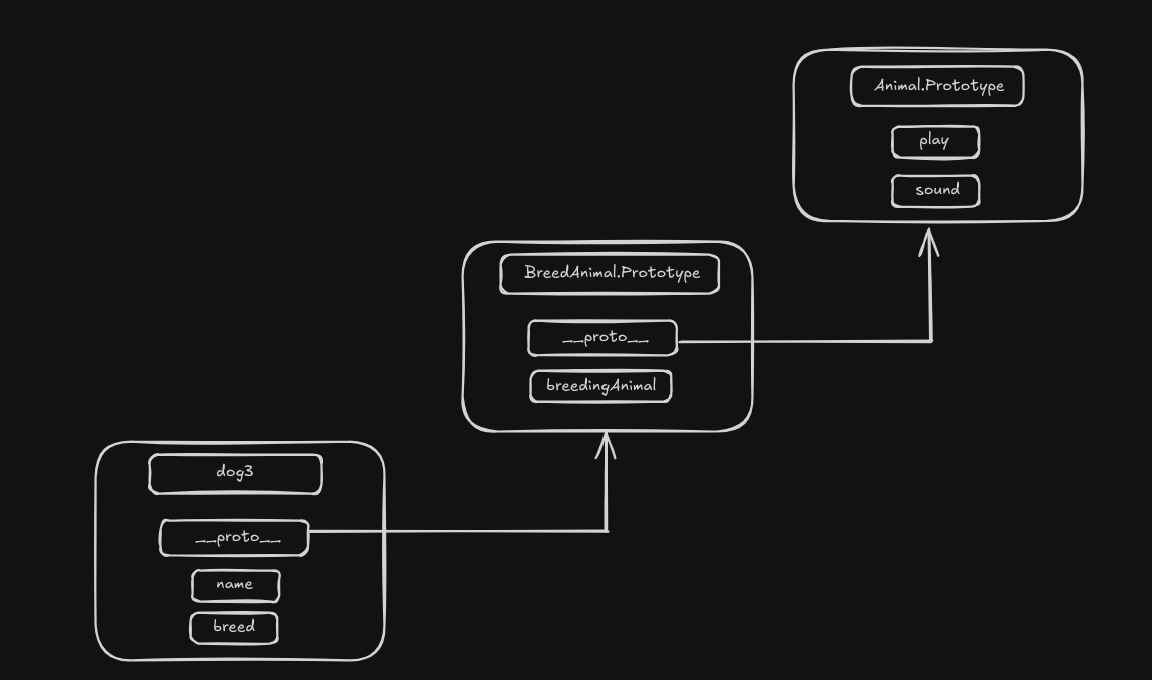
When we try to access a property that’s not directly available on the object, JavaScript recursively walks down all the objects that `__proto__` points to, until it finds the property!
Command Pattern
Command Pattern is generally helpful in decoupling the object that makes the request (sender) from the object that executes the request (receiver).
The code is divided into the following components-
1. A common command interface (optional in JavaScript but useful for consistency).
2. Concrete commands that encapsulate the actions to be performed by the receiver.
3. A receiver, which is the object that performs the actual operations.
4. An invoker, which triggers the execution of the commands.
5. Client code, which sets up the commands and configures the invoker.
// Command Interface
class Command {
   execute() {}
}

// Receiver
class Light {
   on() {
      console.log("Light is turned on");
   }

   off() {
      console.log("Light is turned off");
   }
}

// Concrete Command - Light On
class LightOnCommand extends Command {
   constructor(light) {
      super();
      this.light = light;
   }
   execute() {
      this.light.on();
   }
}

// Concrete Command - Light Off
class LightOffCommand extends Command {
   constructor(light) {
      super();
      this.light = light;
   }
   execute() {
      this.light.off();
   }
}

// Invoker
class RemoteControl {
   setCommand(command) {
      this.command = command;
   }
   press() {
      this.command.execute();
   }
}

// Client Code
const roomLight = new Light(); // Receiver
const lightOn = new LightOnCommand(roomLight); // Command
const lightOff = new LightOffCommand(roomLight); // Command

const remote = new RemoteControl(); // Invoker
remote.setCommand(lightOn);
remote.press();

remote.setCommand(lightOff);
remote.press();
These are the 5 patterns that I have learnt. I will look to add more as I keep learning and discovering new patterns and their use cases.
to be continued...