Writing code requires effort.
Writing readable code requires more effort.
Writing readable code and with a focus on better maintainability and organising is a bit more effort, which does not have much short-term results but is very useful in the long term.
A code written in an organised way, following good naming convention, makes it easier to navigate and understand while working on a refactor and bug fixes in the future.
You might want to skip the extra efforts to make that service method readable, refactoring that function to separate concerns. However, it’s only when you are asked to fix that bug, modify the service to process more logic or improve the performance, and you end up spending much more time understanding the very code you wrote and learn the lesson of “Importance of writing good code“, the hard way.
After experiencing such hardships during the time I spent modifying the functionality, add new features and fixes in last three months, I have come up with some basic rules that I would like to follow while writing/reviewing any piece of code
Avoiding Deeply Nested Code through Inversion and Integration
Deeply Nested Code should be avoided at any cost. As a general rule of thumb, code nested at more than two levels is a yellow sign and a simplification is required. Anything more than three levels of nested depth is a red flag and should be refactored to enhance code quality.
A few ways to look at this -
Instead of thinking the logic in terms of positive, use inversion and implement early fail/return.
Eg-
if (true){
   // logic
} else {
   throw new Error();
}
invert the if statement and skip deeply nested code-
if (false) {
   throw new Error();
}

// actual logic
Merge two similar/related conditions to simply it further
Eg-
if (devFlag) {
    if (editable) {
        // core logic
    }
} else {
    throw new Error("Action not allowed");
}
both the if cond are related and can be merged to simply when to run the core logic
if (devFlag && editable) {
    // core logic
} else {
    throw new Error("Action not allowed");
}

or

if(!editable || !devFlag) throw new Error("Action not allowed")
// core logic
(note- see how we use inversion in the second one)
Key is to always use operators like OR(`||`), AND(`&&`), Coalescing(`??`) (in js) etc., to your advantage.
Break down complex logic and extract into small functions/methods
Eg-
if (devFlag) {
    let totalAmount=0;

    for (let item of cartItems) {
        if (item.category === "tax") {
            totalAmount+= item.amount * 0.1;
        } else if (item.category === "insurance") {
            totalAmount+= item.amount * 0.2;
        } else totalAmount+= item.amount * 0.3;
    }
}
the above logic is good, but it can be further enhanced by extracting the tax calculation in a another function. This allows to reuse the tax calculation and a better way to test the logic.
if (!devFlag) {
   throw new Error("Feature is not implemented!");
}

let totalAmount=0;
for (let item of cartItems) {
   totalAmount+= calculateTax(item)
}


// in a utils file
function calculateTax(item) {
    if (category === "tax") {
        return item.amount * 0.1;
    } else if (category === "insurance") {
        return item.amount * 0.2;
    } else return item.amount * 0.3;
}
If you can try to extract logic into smaller and meaningful functions, it helps in maintainability and code readability.
Now applying all above points to refactor this function-
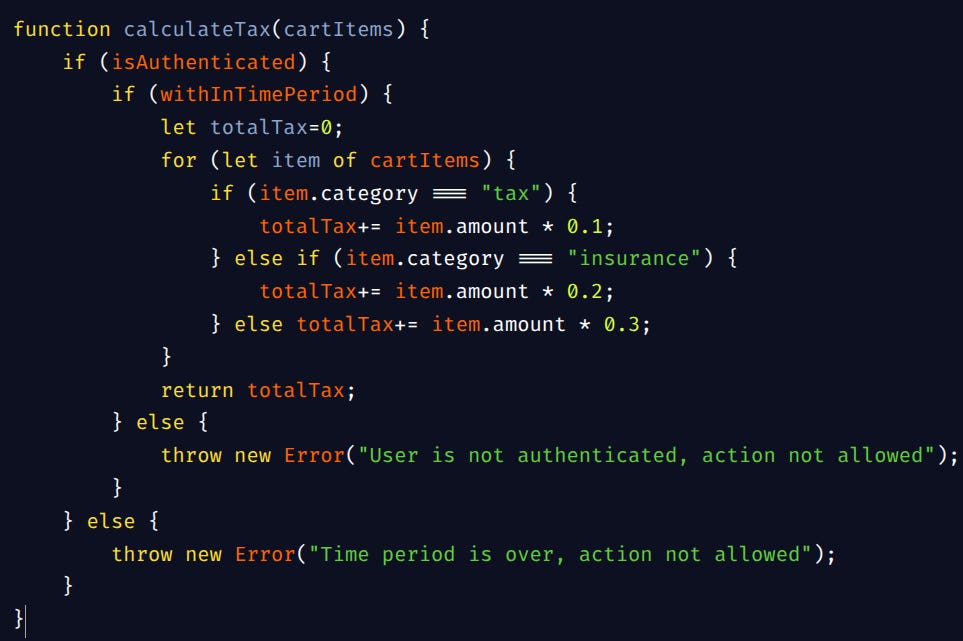
using inversion and combining two if cond (reduces granularity, keeping two seperate if conditions to throw different errors is also valid!)
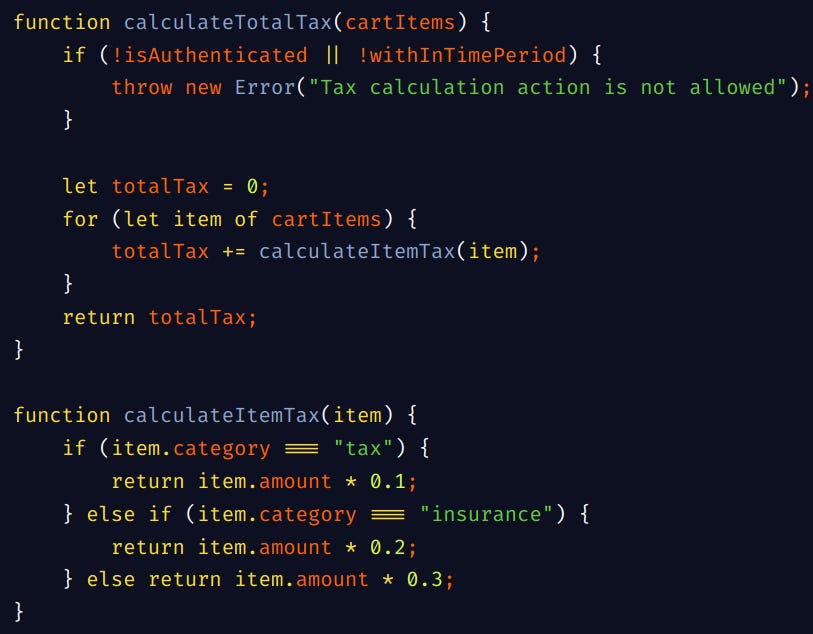
side note:- Following Good Naming conventions has no harm. Naming is subjective and sometimes other developers might not agree (debating over names are pretty common...and illogical sometimes) but an extra minor effort will definitely help a lot!
To summarize,
Code should be easy to read with proper names and atleast decently organized. There are times when you are working on a quick prototype or just a side project, ensuring atleast best practices even though that’s not the major focus will help a lot in future when you are refactoring and being more serious about the side-project.
Adding small ToDo comments whenever you feel you are compromising the quality helps when you are working on it further!
a code should be as easy to read as a summary for the book at a glance
(don’t forget the actual book...)